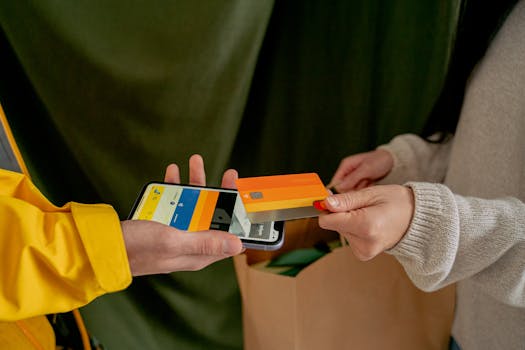
No wallet? No problem. The first time you pay with your phone, it feels oddly futuristic. Cashless shopping apps quietly transform checkout into a tap, swipe, or scan.
As stores and shoppers lean away from bills and loose change, smooth, speedy transactions stand out. That ease matters—saving time, securing purchases, and even helping you track what you spend.
Curious about the perks, pitfalls, and quick wins of cashless shopping apps? Let’s dig into real experiences, practical tips, and find out which methods really save you hassle and cash.
Everyday Rules: Setting Up Seamless Cashless Shopping
Switching to cashless shopping isn’t about being fancy; it’s about removing one less thing to carry. First, you need a working app and a clear plan—otherwise, you risk last-second checkout drama.
Picture yourself at a crowded grocery store. Your hands are full, the card reader’s busy, and you just want out. With a cashless shopping app ready, you skip the line and breeze right through.
Start with Security: Quick Setup Check
Before shopping, confirm your app’s secured with a fingerprint or strong password. Double-check your card’s linked and update notifications for each transaction.
Example: If an app pings you after each purchase, you’ll spot any strange charges instantly. Set transaction limits to catch unusual spending before it grows.
Store Compatibility: Ensuring You Can Pay Anywhere
Not all stores accept every cashless shopping app; some only handle one or two big brands. Test your preferred stores with a small purchase before leaving cash/cards at home.
Some stores let you pay just by scanning a QR code. Others rely on contactless terminals. If you shop at a local farmers’ market, ask if they accept phone-based payments, or check for a payment sticker near the register.
| App Feature | What It Does | Where It’s Useful | What to Do Next |
|---|---|---|---|
| Contactless Payment | Tap phone to reader to pay instantly | Supermarkets, large chain stores | Ask cashier if terminal accepts tap-payment |
| QR Code Scanning | Scan merchant’s code via app | Local shops, cafes, markets | Look for QR stickers near checkout |
| Mobile Wallet Storage | Stores multiple cards and loyalty info | Stores supporting digital wallets | Add all frequent cards for flexibility |
| Transaction Notifications | Sends real-time alerts for spends | Any spending, online or in-store | Enable in-app notifications for security |
| Rewards Integration | Automatically applies loyalty perks | Chain retailers, coffee shops | Link loyalty accounts in advance |
Pocket-Sized Perks: What Cashless Apps Change Right Away
With cashless shopping apps, you track every penny. Receipts appear in your app and round-ups build up savings quietly. Temptation to overspend? The instant notifications make you pause and think.
This isn’t just about ditching coins. It’s about smarter, calmer budgeting and fewer end-of-month surprises.
Beating Checkouts: Smoother Purchases
Shop with friends and split bills on the spot, straight from your app. No more fumbling with crumpled twenties and lost receipts at dinner tables.
- Check which stores allow cashless payments before heading out—save yourself the awkward search for cash.
- Enable real-time alerts to catch duplicate or mistaken charges as they happen; disputing later is tougher.
- Test your setup with small purchases—better to work out bugs on snacks, not high-ticket items.
- Explore your app’s rewards, as many offer small discounts or cash-back unexpectedly at checkout.
- Use budgeting features within the app to track your spending categories day-by-day.
Within a week, you’ll gain new shopping habits—receipts told to your phone, purchases logged, and less worry about losing a wallet.
Protecting Your Details: Security Tactics
Cashless shopping apps don’t store your real card number. Instead, they use tokens unique to each purchase. If a hacker grabs the code, it’s useless for future spending.
- Activate biometric security; fingerprint or face ID adds a layer thieves can’t copy.
- Keep the app logged out by default when not using it—extra effort, but prevents phone theft hacks.
- Monitor your monthly statement against app history to catch differences quickly.
- Always log out on public Wi-Fi: open networks are playgrounds for data thieves.
- Review app permissions every few months, removing old devices and stale accounts.
Kylie, a new user, found that linking her grocery loyalty card to her app prevented missed discounts at checkout. Her weekly savings grew—and she never fumbled for a punch card again.
Tipping Point: When Phone Payments Beat Wallets
Hand over a pile of coins, or flash a phone? A quick scan wins over awkward waits. Sometimes, a cashless shopping app unlocks unexpected shortcuts, especially when time matters most.
Imagine you’re running late for a movie. With a tap, the ticket’s paid. No digging for bills, no waiting while the clerk counts change—just swipe and go.
The Split-Second Advantage: Quick Transactions
In crowded stores, cash slows things down. Using a shopping app, you speed past lines. Some stores even let you scan items as you add them to your basket, then pay and walk out—no cashier needed.
Next time you spot a self-checkout with phone-pay enabled, try this mini-experiment: Time how long it takes to complete your purchase versus using old-school methods. Most users report saving at least a minute per trip. Multiply that by your weekly routines—it adds up fast.
Comparison Moments: When Cash Wins (and When It Fails)
There are still moments when cash reigns. Some garage sales, roadside fruit stands, and tiny shops take only bills. But if you want speed, accuracy, and digital proof—cashless shopping apps usually win.
One shopper shared this: After misplacing a $20 at a concert, she switched to cashless apps for all outings. Now, every payment gets a digital trail and nothing falls through the cracks.
The Little Details: Things Most Apps Won’t Tell You
Open up your favorite shopping app settings. You’ll notice custom controls—monthly limits, receipt forwarding, or instant alerts. Small details shape big habits and keep your spending sane.
For extra privacy, you can often mask transactions or block retailers directly in some cashless shopping apps. That comes in handy after an unpleasant store incident or if you want to hide surprise gifts.
Experiment With Budget Features
Set a daily cap right in your app before heading out. If you hit your max, your phone blocks extra spending until tomorrow. That’s a wake-up call—and a strong spending discipline tool.
If you’re splitting living expenses, some apps let you pre-set regular monthly charges. The roommate who always forgets their share? Not anymore. The autopay prompt handles it without awkward texts.
Don’t Ignore the Update Reminders
Every update matters. Behind the scenes, cashless shopping apps quietly fix holes and beef up security. Make a habit of checking for new versions weekly—outdated apps leave your details exposed.
Set reminders, or schedule app updates during quiet times. You’ll gain peace of mind and the latest time-saving features with little effort.
Shopping With a Team: Cashless for Groups and Families
Sharing accounts, joint lists, or pooling funds isn’t reserved for business trips. Group grocery runs, family outings, and even neighborhood parties feel smoother when everyone’s using cashless shopping apps.
Try building a shared shopping list in-app. Spouses or roommates can add items anytime, while assigned payers handle purchase alerts as each order is checked out. Less chance for missed items or double buys.
Checklist: Setting Up for Multiple Users
Decide who manages which spending category—one for groceries, another for household bills, etc. Each person links their card, and all see real-time history for that category.
Enable notifications for all users, so everyone catches overspending or reward points the minute they’re added or spent.
- Share the app and account setup with family or roommates, ensuring everyone knows the basics.
- Create distinct categories for each shopping type—groceries, household, outings—to clarify spending roles.
- Agree on monthly caps for each group member to avoid disputes and encourage smart habits.
- Enable real-time purchase notifications for the group’s key spending categories.
- Regularly review the in-app history as a team; identify trends, savings, or errors together.
Fixing Mistakes Together
Group shopping may see duplicate or missed buys. Use your app’s built-in messaging or notification tools to spot and flag these quickly before they cause confusion or overspending.
Plan short weekly check-ins: Who bought what? What needs adjusting? With instant records, nobody plays the memory game at checkout anymore.
What to Watch for: Avoiding Cashless Pitfalls
Certain mistakes repeat. Leaving an app unlocked, forgetting which store supports which app, or not setting caps—it’s easy to overlook these basics when you’re excited about cashless speed.
The golden rule: treat your phone like your wallet. Lose it, and someone could go on a shopping spree. Always lock it down, and log out after use in public places.
- Reset your password after major app updates or if you suspect your account details leaked.
- Never store PINs or sensitive banking data in your phone’s notes or messaging apps.
- Regularly back up digital receipts in cloud storage for warranty and return claims.
- Limit location permissions to essential features; extra tracking isn’t needed for smooth shopping.
- Practice tap-to-pay etiquette: check the screen and receipt before leaving the register.
Pay attention to receipts and bank statements during your first cashless month—small errors pop up less often but still matter if you miss them.
Ready for Your Routine: The Cash-Free Life
Digital wallets and cashless shopping apps will only grow more common. The setup takes a few minutes, but the daily time savings and security boost become obvious quickly.
If you’re still unsure, start small. Test a cashless payment the next time you grab coffee or groceries. Compare your experience—was it faster? Easier? More transparent?
There’s no need to go all-in overnight. Try one or two features, review your app history for surprises, and notice what changes about your spending style. The new habits will sneak up—and likely stick around.